Building an Eligible-Cohort Adoption Rate Metric for Gated Features
Correctly defining your eligible denominator prevents misreading gated feature adoption rates.

Userpilot found that just 6% of SaaS features get regular use, a figure that already signals how much of a product's surface area goes untouched. Now most companies lock capabilities behind plan tier, role, or a permission flag before anyone even sees them. The adoption picture is likely distorted, hiding behind a denominator most teams never bother to define correctly. Get that denominator wrong, and every conclusion built on top of it is wrong too.
A standard feature adoption rate divides adopters by all logged-in users. Fine for an open feature. Wrong math for a gated one, because the denominator is stuffed with accounts that were never eligible. Someone on an entry-level plan, someone without the admin role, someone who never got the beta flag: none of them could have adopted the feature no matter how good it is, and none of them belong in the count. A team still dividing by total users on a gated feature is measuring how many people are logged in, not how many could plausibly have adopted the feature. It's measuring something else and calling it adoption.
Get this wrong in one direction and a team sees a low rate on a gated reporting tool, panics, and launches a re-education campaign aimed at users who never had access to begin with. Meanwhile the finance admins who actually had the permission flag might be adopting at a much higher clip, buried inside a denominator that includes everyone else. Get it wrong the other way and a gated feature with a tiny eligible population posts a flashy, high adoption rate while the real problem, almost nobody has access to it, goes unnoticed. Both failures trace back to the same root cause: nobody defined the denominator before running the query.
Building a number that means anything takes four decisions, made in order: who qualifies, what counts as adoption, which entity to count, and over what window. Skipping one means the number on the other end can't tell anyone what to do next. What follows walks through each decision as it applies to gated features specifically, where plan, role, and permission make the denominator the most consequential call of the four.
Decision one: defining the eligible population when access is conditional
The formula is simple: distinct eligible users or accounts that reach meaningful use, divided by distinct eligible users or accounts in the same window, times 100. The hard part is defining "eligible" before anyone runs the query, not backing into it from whatever activity happens to show up in the logs afterward.
Four separate conditions can each shrink the eligible population on their own, and most teams only ever check one.
- Plan tier. A feature locked to higher-tier plans removes every account on the entry-level plan from the count.
- Role or seat type. An admin-only workflow excludes every non-admin user, even on a plan where the feature is technically available.
- Permission flag. Explicit grants, like a beta invite or an org-level toggle, exclude everyone who wasn't flagged, even if plan and role both qualify.
- Feature flag or rollout stage. In a gradual rollout, only the flagged slice of users is eligible, and flagging someone doesn't guarantee the entry point actually rendered on their screen. Flag evaluation and feature exposure are two different events. Treating them as one causes the count to overstate who could plausibly have adopted anything.
These stack, and each additional filter narrows the denominator further. A feature gated by plan, role, and permission all at once can end up with a denominator that's a sliver of the total user base. Each filter has to come from the account or user database, never inferred from product events. Eligibility lives in records: plan tier, role assignment, permission grant. Adoption lives in analytics. A correct denominator needs both, queried together, one never standing in for the other.
"Active" has to fit the feature too, and this is where most definitions quietly fail. A login-based window makes sense for something like core navigation. It makes no sense for an invoice-close workflow a finance admin touches once a month, where a 30-day login requirement would exclude perfectly normal usage. For gated features especially, the relevant window is often narrower and stranger than the default, and borrowing the default anyway is how good adoption gets misread as bad.
What comes out of this decision should be a named, queryable cohort: something like "active account admins with export permission enabled, last 30 days." Specific enough that another analyst could rerun it and land on the same group. Skipping this step causes teams to confuse three different things: everyone entitled to the feature on paper, everyone actively eligible right now, and everyone who's actually had a real shot at encountering it. Three different denominators, three different questions.
Decision two: what counts as adoption, not just activity
Activation and adoption are not the same event, and gated features widen the gap between them. Activation means a user touched the feature once. Adoption means the feature became part of how they actually work. For a gated feature, that first touch is often just a setup step, a configuration screen, provisioning, none of which delivers value on its own.
Think of the path in stages: eligible, exposed, discovered, first use, meaningful use, repeat use, retained use. Opening a report builder is discovery. Opening a report builder alone does not establish that meaningful use occurred. Saving a report and scheduling it to deliver, that's meaningful use, and that's the threshold that should earn adoption credit. Draw that line before anyone starts tracking, and draw it specific to the feature. It never transfers cleanly from one product to the next.
Gated features tend to have a longer climb from first use to meaningful use than open ones. Someone had to get provisioned, maybe trained, before they could even try. The workflow itself might be infrequent by design too: an annual compliance task looks nothing like a daily editing habit, and the adoption threshold has to bend around that difference instead of pretending every feature adopts on the same clock.
The test for setting the threshold is blunt. Does the qualifying behavior prove the user got the value the feature was built to deliver? If yes, that's the line. If it's just a click or a page view, it isn't, and no amount of dashboard polish changes that.
One percentage can't carry the full story either. Breadth (how many eligible users adopted) and depth (how deeply each one uses it) are different questions. Collapse them into a single number and it hides which one is actually broken. The headline rate should track meaningful use, but it shouldn't be the only number anyone looks at.
Writing the adoption event down alongside the rate solves a real, boring problem: definitional drift. A label like "Reporting export adoption, eligible active account admins, completed scheduled export, 30 days" tells the next analyst what's being measured six months from now, without a meeting to sort it out. Skipping that label eventually causes someone to count a feature_clicked event as adoption. The numerator inflates, a discovery problem gets mistaken for a success story, and the team stops investing in a feature most eligible users never got real value from.
Decision three: counting users versus counting accounts for gated features
Feature adoption can get measured at the user level or the account level, and the right choice depends on who owns the outcome, not on habit. Product teams tend to care about the person. RevOps and growth teams tend to care about the account, because that's the unit that renews or churns.
For gated features, the account view is usually the more actionable one for revenue-facing teams: it's the account's plan that unlocked the feature and the account's renewal on the line. But lean on account-level adoption alone and a real gap disappears, because plan status and renewal status say nothing about how many users inside the account actually engaged. If the only person touching an enterprise-gated feature is the single admin who set it up, that admin's activity marks the whole account "adopted," while everyone else the feature was built for never touches it. The masking occurs when a handful of highly active accounts generate most of the usage events while everyone else stays quiet: the aggregate number looks healthy, and the reach gap stays invisible until renewal time.
Features gated by both plan and role need both lenses running at once. Not one chosen over the other. Account-level adoption tells you how many paying accounts have anyone using the feature. User-level adoption inside those accounts tells you whether the roles the feature was actually built for are the ones adopting it. Treating person and account as a measurement discipline, not a stylistic preference, changes what the number means: an account kept alive by one lone active admin is not the same story as an organization where a whole team has picked the feature up, even though both might report as "adopted.""
The practical move is to report both numbers and label each one directly: "eligible account admins" for the user-level view, "accounts with at least one eligible admin who adopted" for the account-level view. This decision also shapes what fixing the problem looks like. Weak account-level adoption points upstream, often a provisioning step or a sales handoff that dropped the ball. Weak user-level adoption inside accounts that already look adopted points somewhere else entirely: internal enablement, role-specific guidance, or friction baked into the workflow itself.
Decision four: choosing a time window that fits the feature's natural cadence
A 30-day window is a default. For features with an infrequent natural rhythm, quarterly reporting, annual compliance tasks, monthly invoice runs, that default undercounts adoption even among users doing everything right. A one-time integration, a daily editor, and an annual compliance workflow each demand a different meaningful-use threshold, so the window has to bend to match the feature or it produces a false reading.
Three window types cover most cases.
- Fixed cohort window. Measure adoption within a set number of days of becoming eligible, say within 30 days of a plan upgrade or a permission grant. Right choice for tracking onboarding speed among users who just got access.
- Rolling activity window. Count adopters in any trailing period divided by eligible users in that same period. Works as the default for features people use on a regular, recurring basis.
- Cadence-matched window. Set the window to match the feature's own rhythm: monthly for a monthly workflow, quarterly for a quarterly one. For low-frequency gated features, this isn't optional. Skipping it causes the rate to structurally undercount normal, correct usage.
Duration measures whether adoption sticks, calculated as the share of an adoption cohort that keeps using the feature in later, comparable periods. For gated features, this catches a specific failure mode: someone adopted once, maybe nudged by an onboarding flow or a CSM outreach, but the feature never became part of how they actually work day to day.
Cohort analysis is the container that makes all of this possible. Take everyone who became eligible in a given window, track how many reached meaningful use, then track how many came back in the next comparable period. Time to adopt is a useful companion measure here: the gap between first eligibility, or first exposure, and first meaningful use. Anchor on eligibility versus exposure and the lag reveals different things, a setup-friction problem in one case, a plain discovery problem in the other, and both need to be measured separately rather than folded into one number.
None of the first three decisions survive a badly chosen window. Get the eligible population right, get the adoption threshold right, pick the wrong window, and the rate still lies.
Reading the rate as a diagnostic, not a verdict
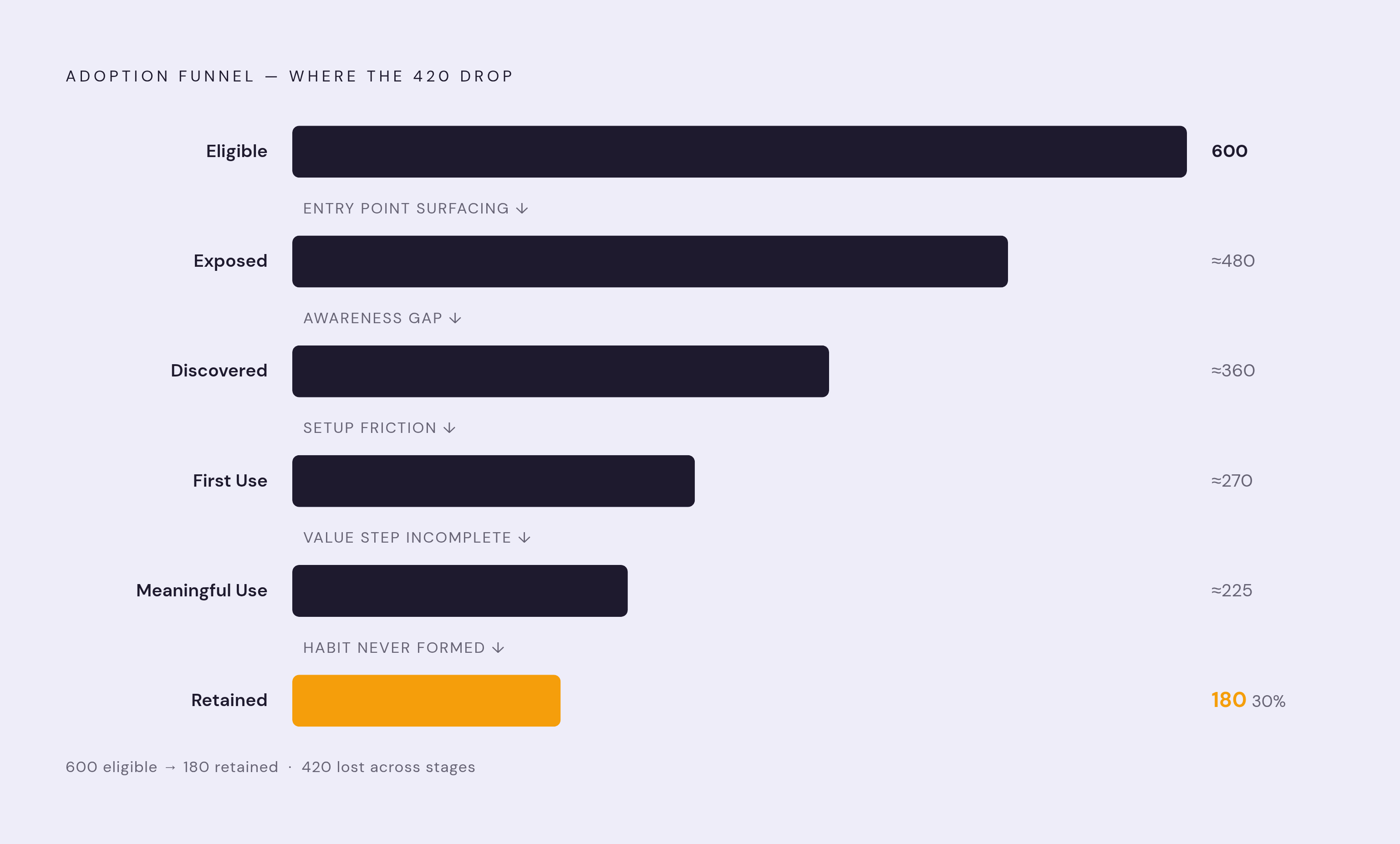
A headline number tells you the size of a gap, never where the gap sits. That's what the stage funnel is for: eligible, exposed, discovered, first use, meaningful use, repeat use. Each stage-to-stage drop points at a different problem, and gated features tend to produce a recognizable pattern at each one.
Large eligible population, low exposure? The feature got provisioned, but its entry point isn't surfacing anywhere a user would see it. Check whether in-product announcements are even scoped to reach the eligible cohort. Decent exposure paired with a weak first-use rate points to friction in setup or configuration, an onboarding problem rather than an awareness one. Good first-use numbers paired with weak meaningful-use numbers mean people are touching the feature but not finishing the step that delivers value, so look hard at whatever sits right before that finish line. A healthy meaningful-use rate that fades into weak repeat or duration numbers usually means adoption got prompted by a nudge, a campaign, a customer success call, but never turned into habit. Either the feature doesn't fit the user's actual workflow cadence, or the value on the second use wasn't obvious enough to bring anyone back.
Take 600 eligible users and 180 who completed the defined adoption action: a 30% rate. What happened to the other 420 is the whole story. The funnel answers that, stage by stage, instead of leaving the team to guess at a single number.
Splitting account-level losses from user-level losses inside that funnel points to different fixes. A weak account-level number calls for an upstream fix. A weak user-level number inside otherwise-adopted accounts calls for an internal one. Confuse the two, and a team spends a quarter chasing the wrong owner.
For rough orientation, not as a target: average core feature adoption runs around 24.5%, with the top quartile clearing 45%. A paid gated feature adopted by under 10% of its eligible cohort isn't doing its job of driving conversions, full stop. Treat these as landmarks, not goalposts. The eligible-denominator definition changes what any given percentage actually means from one feature to the next.
None of this matters if the number doesn't change anyone's behavior. An adoption rate that doesn't alter how a team messages, sequences, or onboards newly-eligible users is decoration on a dashboard, nothing more. It earns its keep only when it points at a specific stage where eligible users are getting stuck, and someone actually acts on it.
Keeping the metric honest over time
Gating conditions don't sit still. Plan structures get restructured, roles get renamed, permission models get rebuilt, and any one of those changes can quietly shift the eligible population without anyone updating the denominator definition to match. A metric that was accurate in January can be wrong by June if nobody's watching the underlying gating logic. Dashboards don't flag their own decay.
The same label used to define the metric doubles as its audit trail. "Reporting export adoption, eligible active account admins, completed scheduled export, 30 days" names four fields. Any one of those four changes in the product or the data model, and the metric's definition needs a matching update.
As of updated figures from 2026, a large majority of enterprises and a strong majority of SMBs already have AI agents deployed inside their SaaS tools, and those agents call APIs and fire product events around the clock. On a gated feature, an agent triggering a permissioned workflow endpoint can look identical to human adoption in the raw data, even when no person was involved anywhere in the chain. Filtering agent-generated events out of the human adoption numerator isn't optional anymore for any gated feature where API access or automation runs common. It sits on par with getting the denominator right from the start.
Definitional fragmentation is the deeper risk. If product, RevOps, and growth each query the eligible population their own way, different activity rules, different plan filters, different assumptions about which roles count, they'll produce three different rates from the exact same underlying data. Nobody will be able to say which one is right, and nobody should trust any of the three until the definitions get reconciled. A written, version-controlled definition of each of the four decisions, who qualifies, what counts, which entity, what window, is the only real control against that kind of drift.
These four decisions are reusable, and because the product keeps changing, they belong in a shared document or query anyone on the team can open, question, and revise as those changes happen. The number itself is almost beside the point. What makes it trustworthy enough to act on is the reasoning that built it, and that reasoning has to outlast whoever wrote it down first.